

Our top three streaming devices

Prices checked — 17 September 2026: Apple listed Apple TV 4K at $299 for 64GB Wi-Fi or $399 for 128GB Wi-Fi + Ethernet. Google listed its Streamer at $159.99. Amazon's Fire TV Stick 4K Plus was around $99 and the current Fire TV Stick HD around $79. Marketplace prices and stock can change quickly.
Apple TV 4K
It combines quick navigation, excellent app support, useful output matching and a restrained interface in hardware that should remain pleasant to use for years.
A dedicated streaming device can make an older television feel new again. It can also replace a slow, cluttered or poorly supported smart-TV platform without replacing an otherwise excellent screen.
The right choice depends on more than 4K resolution. Australian app support, interface speed, remote design, video and audio formats, Ethernet, casting, storage and recurring fees all affect everyday ownership.
The short answer
Choose Apple TV 4K for the best overall experience. Its A15 Bionic hardware, consistent interface, broad app support, Dolby Vision, HDR10+ and Dolby Atmos make it the safest premium choice. It is particularly attractive for households already using iPhone, AirPods, Apple Music, Photos or Fitness+.
Choose Google TV Streamer 4K for the strongest value. At $159.99 it includes 32GB of storage and Ethernet, supports Dolby Vision and Dolby Atmos, casts from compatible apps and works as a Google Home and Matter hub with Thread built in.
Choose Fire TV Stick 4K Plus when the budget is near $100. It supports the important 4K HDR formats and Wi-Fi 6, although its home screen is more promotional and its storage is tighter.
Our 2026 shortlist
- Best overall: Apple TV 4K — fast, polished and well integrated with Apple devices.
- Best value: Google TV Streamer 4K — 32GB, Ethernet and Google Cast for $159.99.
- Best budget 4K streamer: Amazon Fire TV Stick 4K Plus — capable 4K HDR around $99.
- Best for an older 1080p television: Amazon Fire TV Stick HD — the updated 2026 Wi-Fi 6 model.
- Best for free-to-air and streaming together: Fetch Mini G5 — tuner, guide, apps and optional channel packs.
How we chose
We compared current Australian pricing and availability, official specifications, interface speed, application selection, remote design, storage, Ethernet and Wi-Fi, 4K HDR formats, Dolby Atmos, casting, phone integration, smart-home functions and recurring costs. This is an editorial shortlist based on current product information, not a claim that every device was laboratory-tested side by side.
Application support and format delivery can change independently of the hardware. Verify any specialist Australian service, uncommon codec or essential surround format before buying.
1. Apple TV 4K
The premium box to buy when smooth operation matters more than the lowest price.
Apple sells the current third-generation Apple TV 4K in two versions: 64GB with Wi-Fi for $299, or 128GB with Wi-Fi, Gigabit Ethernet and Thread networking for $399. Both use Wi-Fi 6, HDMI 2.1 and Bluetooth 5.0.
The interface is responsive and relatively restrained. Match Dynamic Range and Match Frame Rate can avoid forcing one output format across every program. AirPlay, Apple Photos, AirPods and Apple services integrate naturally.
The aluminium Siri Remote charges by USB-C and can control compatible television or receiver power and volume through infrared or HDMI-CEC. A compatible iPhone can help locate a missing remote.
What we like
- Fast and consistent interface.
- Dolby Vision, HDR10+ and Dolby Atmos.
- Strong app quality and Apple integration.
- Useful frame-rate and dynamic-range matching.
What to consider
- Substantially more expensive than rivals.
- Ethernet is limited to the $399 model.
- HDMI and USB-C charging cables are sold separately.
- Less natural phone integration for Android users.
Best for: the main television, especially in an Apple household or where a calm, responsive interface is worth paying for.
2. Google TV Streamer 4K

A sensible middle ground with generous storage and Ethernet included.
Google lists the Streamer at $159.99 with 32GB of storage and 4GB of memory. It supports up to 4K HDR with Dolby Vision, Dolby Atmos, Google Cast and built-in Ethernet.
The home panel controls compatible smart-home devices, while Thread is built in for improved Matter connectivity. A button on the box can ring the remote, and its customisable key can launch an app, switch inputs or open the home panel.
Google TV places recommendations prominently, and universal search does not integrate every Australian application equally. An HDMI 2.1 cable is required and is not supplied.
What we like
- 32GB storage and 4GB memory.
- Ethernet included at $159.99.
- Dolby Vision, Dolby Atmos and Google Cast.
- Remote finder and smart-home panel.
What to consider
- Recommendation-heavy home screen.
- HDMI cable is not included.
- Service integration varies by app.
- Apple households may prefer AirPlay and tvOS.
Best for: Android and mixed-device households wanting a permanent 4K box without Apple pricing.
3. Amazon Fire TV Stick 4K Plus

The easiest way to add capable 4K HDR streaming for about $100.
The Fire TV Stick 4K is now sold as Fire TV Stick 4K Plus. Amazon describes it as the same device under the new name, with Wi-Fi 6, Dolby Vision, HDR10+, Dolby Atmos and an Alexa Voice Remote.
It hides behind the television and includes a power adaptor, cable and HDMI extender. Its remote can control compatible television, soundbar and receiver power and volume functions.
The interface heavily promotes recommendations and Amazon services. Storage is tighter than Google's 32GB, and Ethernet requires a compatible optional adaptor.
What we like
- Good 4K HDR support around $99.
- Wi-Fi 6 and Alexa voice control.
- Compact installation behind the television.
- Frequent genuine sale pricing.
What to consider
- Promotional, Amazon-focused interface.
- Less storage than Google TV Streamer.
- Ethernet adaptor costs extra.
- Wall-mounted televisions can weaken Wi-Fi reception.
Best for: a 4K television when the budget is near $100 and Prime Video or Alexa is already part of the household.
4. Amazon Fire TV Stick HD
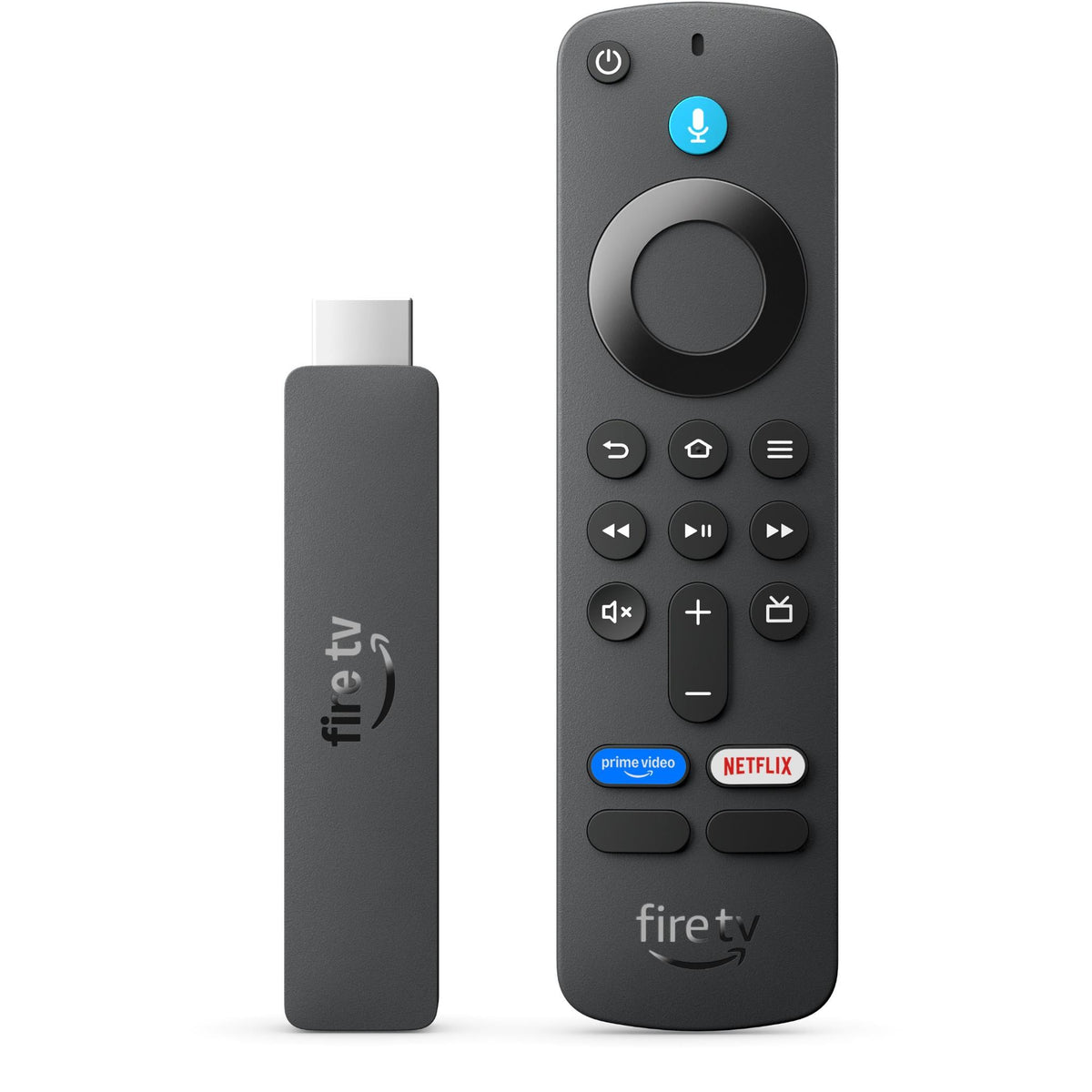
A low-cost update for a good Full HD television that does not need 4K.
The current 2026 Fire TV Stick HD is Amazon's updated Full HD model. It supports Wi-Fi 6 and a redesigned Fire TV experience, and Amazon supplies a USB-C cable for Direct Power from a compatible television.
It is appropriate for a bedroom, guest room, caravan or older screen limited to 1080p. The major Australian services are represented, although subscription fees and individual app support still apply.
Do not buy it for a 4K television merely to save a small amount. The 4K Plus provides more headroom and is usually the smarter long-term purchase.
What we like
- Low purchase price.
- Current Wi-Fi 6 hardware.
- Compact and easy to move.
- Remote handles compatible TV power and volume.
What to consider
- Limited to Full HD output.
- Basic storage and performance.
- Promotional Fire TV home screen.
- Poor value for a 4K television.
Best for: an older 1080p television that needs current apps and a usable voice remote.
5. Fetch Mini G5
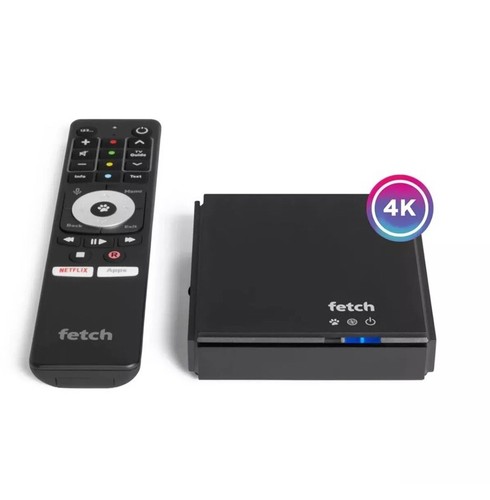
The specialist choice when a traditional Australian channel guide still matters.
The Mini G5 combines a free-to-air tuner, electronic program guide, streaming apps, a movie and television store and optional premium channel packs. Its HY4424 hardware supports Wi-Fi 6, Gigabit Ethernet, Bluetooth and 4K HDR, including Dolby Vision for compatible content.
It does not contain a hard drive and is not a full PVR. Retail, Telstra and other provider-supplied units can carry different activation, account and service conditions, so verify that a marketplace box is eligible for the Fetch service you intend to use before ordering.
Recurring Fetch access, channel-pack and third-party streaming fees change the value. It is most compelling for viewers who still want free-to-air channels and catch-up services in one guide.
What we like
- Free-to-air tuner and proper channel guide.
- Streaming apps and optional channel packs.
- Wi-Fi 6 and Gigabit Ethernet.
- Television-style voice remote.
What to consider
- Access and channel fees may apply.
- No internal hard drive for full PVR recording.
- Provider-locked marketplace units need care.
- Less open app selection than Google TV.
Best for: viewers who want live Australian television, catch-up and major streaming apps through one familiar guide.
Why NVIDIA Shield TV Pro is no longer our default pick
NVIDIA Shield TV Pro remains useful for particular Plex, local-media, codec and game-streaming requirements. The problem is its age and Australian value: the current hardware platform dates from 2019, local availability is inconsistent and imported pricing can be excessive.
Buy one only when its specialist capabilities are understood and required. Apple and Google provide fresher mainstream hardware, clearer Australian support and lower-risk purchasing for ordinary streaming.
Do you need a streaming device with a smart TV?
Not necessarily. If the television's built-in applications remain fast, supported and easy to use, an external box may add little. A streamer becomes worthwhile when apps freeze, updates stop, important services are missing, advertisements dominate or the remote and menus are frustrating.
It can also standardise several televisions. The lounge, bedroom and holiday home can use the same app layout and remote rather than three unrelated smart-TV systems.
Picture and sound formats
HDR10 is the common baseline. Dolby Vision and HDR10+ can carry dynamic metadata, but the television and selected streaming app must support the same format. Apple TV 4K covers Dolby Vision and HDR10+, while Google TV Streamer and Fire TV Stick 4K Plus also support the major mainstream HDR requirements.
Dolby Atmos requires compatible content, an appropriate subscription tier, device settings and a compatible television, soundbar or receiver. If a system reports stereo, inspect the streamer's audio output and the television's eARC or digital-audio passthrough settings before replacing hardware.
Wi-Fi, Ethernet and storage
Reliable Wi-Fi is sufficient for most 4K streaming. Ethernet is useful near a router, in a congested network or when a wall-mounted television shields a stick. Google and Fetch include Ethernet; Apple reserves it for the 128GB model; Fire TV sticks need a compatible adaptor.
Storage holds applications, updates, caches and games—not complete streamed movie libraries. Google's 32GB is generous for a mainstream box. Apple provides 64GB or 128GB, while inexpensive sticks can feel cramped sooner.
Check Australian application support
- Confirm Netflix, Prime Video, Disney+, YouTube and Stan, plus the catch-up services you actually use.
- Check Kayo Sports, BINGE, BritBox, Optus Sport, Plex and community-language services individually.
- Application availability does not guarantee identical 4K, HDR, Atmos or frame-rate behaviour.
- Subscriptions are separate unless a specific promotion states otherwise.
- Review profiles, purchase restrictions and privacy controls during setup.
How to connect a streamer correctly
- Use a television or receiver HDMI input that supports the required 4K and HDR formats.
- Use the supplied power arrangement; do not assume every television USB port provides enough power.
- Install system updates before judging speed or app behaviour.
- Enable the television's enhanced or deep-colour HDMI mode where required.
- Enable frame-rate and dynamic-range matching where the platform and applications support them.
- Configure television power and volume control on the streaming remote.
- Test known 4K HDR and Dolby Atmos material.
A black screen or missing HDR commonly points to an HDMI cable, input setting or receiver-passthrough limitation. Test the streamer directly on the television before assuming the device is faulty.
Common buying mistakes
- Buying a 1080p stick for a 4K television to save a small amount.
- Assuming every Australian app supplies identical features on every platform.
- Forgetting that Apple and Google do not include an HDMI cable.
- Buying a Wi-Fi-only product for a known wireless dead zone.
- Assuming flash storage can record free-to-air television.
- Ignoring Fetch activation, access and channel-pack fees.
- Buying an imported or provider-locked device without checking warranty and activation eligibility.
Frequently asked questions
What is the best streaming device for most people?
Apple TV 4K provides the best overall experience when price is secondary. Google TV Streamer 4K is the stronger value recommendation for most mixed-device or Android households.
Will a streamer improve picture quality?
It can improve app performance, format matching and consistency, but it cannot turn a poor panel into a premium television. The service, subscription tier, network, settings and display still determine the result.
Is Ethernet required for 4K?
No. Healthy Wi-Fi can stream 4K reliably. Ethernet is useful where Wi-Fi is congested or weak and can reduce buffering or quality changes caused by an unstable connection.
Can I use the streaming remote for television volume?
Usually. Apple, Google, Amazon and Fetch remotes provide compatible television controls through HDMI-CEC, infrared or both, but exact support varies by television and audio system.
How much internet speed do I need?
As a practical starting point, allow about 25Mbps of reliably available bandwidth for one 4K stream, plus capacity for other household activity. Stability matters more than a high headline plan speed that collapses at busy times.
Our verdict
Buy Apple TV 4K for the best overall experience. It is fast, polished and particularly strong in an Apple household, although its Australian price makes it a premium choice.
Buy Google TV Streamer 4K for the best balance of price and capability. Its 32GB storage, Ethernet, broad app support, casting and smart-home functions make it the easiest value recommendation.
Buy Fire TV Stick 4K Plus near $100. Use Fire TV Stick HD only for a 1080p television. Choose Fetch Mini G5 when live Australian channels and a traditional guide are essential and its ongoing conditions are acceptable.
Sources and further reading
- Apple Australia — Apple TV 4K models and pricing
- Apple Australia — Apple TV 4K technical specifications
- Google Store Australia — Google TV Streamer 4K pricing and features
- Amazon Australia — Fire TV Stick 4K Plus
- Amazon Australia — Fire TV Stick HD 2026
- Fetch Australia — current devices, packages and service information
- eBay Australia — Apple TV 4K 64GB Australian listing checked
- eBay Australia — Fetch Mini G5 HY4424 listing checked
Prices and availability checked: 17 September 2026. Prices, sellers, stock, applications, service fees, firmware and format support can change. Confirm the exact Australian model, activation eligibility, included accessories, warranty and checkout total before purchasing.
Need a second opinion?
Ask Adrian before making the decision.
Tell us what you are choosing between, what matters most to you and what you have already checked.