

Our top three universal remotes

Prices checked — 17 September 2026: SofaBaton listed the X1S at US$179.99 before Australian delivery, tax and currency conversion. JB Hi-Fi listed the Evolve 4 at $69.95, the 8 Device Remote at $49.95 and the Big Button Remote at $44.95. Marketplace pricing and stock can change quickly.
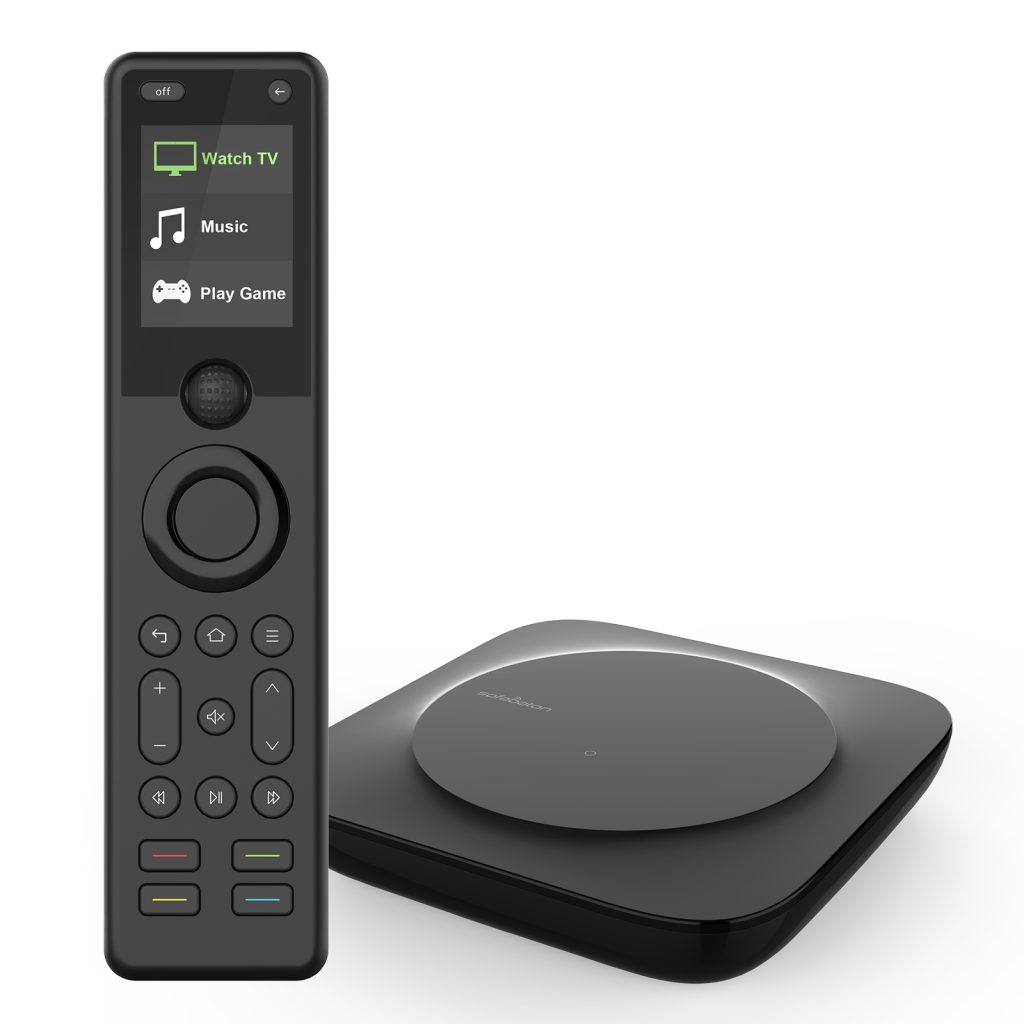
SofaBaton X1S
It is the most capable practical choice for a multi-component system, combining a physical remote, hub, activities, infrared, Bluetooth and selected network integrations.
A good universal remote removes clutter and makes a home-entertainment system easier to use. A bad one replaces three familiar remotes with a single confusing controller that still cannot turn everything on correctly.
The market is much weaker since Logitech stopped making Harmony hardware, but useful choices remain. The important decision is whether you need hub-based activities for a complete home theatre, a simple infrared replacement or app-based control for older appliances.
The short answer
Choose the SofaBaton X1S for a television or projector, AV receiver, streamer, disc player and other equipment that should work through activities. Its hub removes the need to point the handset at every component, while two wired infrared blasters help with equipment inside cabinets.
Choose the One For All Evolve 4 for the average Australian lounge room. It combines four infrared remotes, provides two simple activities and is readily available through a major local retailer.
Choose the One For All Big Button Remote when clarity matters more than capacity. Its high-contrast layout can be more successful than a premium remote full of rarely used controls.
Our 2026 shortlist
- Best overall: SofaBaton X1S — a rechargeable hub-based remote for complex systems.
- Best everyday remote: One For All Evolve 4 — four-device infrared control with two smart activities.
- Best for many infrared devices: One For All 8 Device Remote — inexpensive capacity for older components.
- Best simple large-button remote: One For All Big Button Remote — two-device control with a clear layout.
- Best app and voice-control hub: BroadLink RM4 Pro — infrared and supported 433 MHz fixed-code RF control without a bundled handset.
How we chose
We compared current Australian availability and pricing, official compatibility information, infrared and Bluetooth support, hubs, activities, learning functions, physical layout, backlighting, setup difficulty, app dependence, power requirements and manufacturer support. This is an editorial shortlist based on current product information, not a claim that every remote was laboratory-tested with every device.
Compatibility is model-specific. A remote that works with five of six essential products has failed its job, so confirm every important device and function before the return window closes.
1. SofaBaton X1S
The closest sensible mainstream replacement for a Logitech Harmony Hub system.
The X1S combines a handheld remote, a central hub and two wired infrared blasters. SofaBaton lists support for infrared devices, Bluetooth LE, classic Bluetooth, Roku over Wi-Fi, Philips Hue and Sonos, subject to the exact device and current integration.
Activities can turn on several components, select the required inputs and assign each button to the right device. A Watch Movie activity might send navigation to a streamer while volume goes to the receiver and picture controls go to the television.
The hub provides 360-degree infrared transmission with a manufacturer-stated range of up to 30 feet. The 2-inch LCD handset has motion-activated backlighting, a remote-finder feature and a claimed battery life of up to 45 days.
What we like
- Hub-based activities for several components.
- Infrared, Bluetooth and selected network control.
- Two IR blasters for cabinets and blind spots.
- Rechargeable handset with backlit buttons.
What to consider
- Setup can require command learning and delay adjustment.
- Australian purchase is usually imported or marketplace stock.
- Most configuration depends on the mobile app.
- Compatibility must be checked for exact model numbers.
Best for: a multi-component lounge or theatre whose owners are prepared to configure activities carefully.
2. One For All Evolve 4
The safest locally available choice for a normal infrared entertainment system.
The Evolve 4 controls four infrared devices and is designed for a television, set-top box, disc player and soundbar or audio system. One For All also lists infrared compatibility with media players and Apple TV hardware.
Watch TV and Watch Movie activities let channel keys operate a set-top box while volume controls a television or soundbar. That is not as flexible as SofaBaton, but it removes some device-mode switching.
The remote includes a learning function for copying compatible infrared commands and an ultra-wide transmission angle. It uses two AAA batteries, which are not included.
What we like
- Easy Australian retail availability.
- Useful activities at a modest price.
- Learning for missing infrared commands.
- No account, cloud service or charging cable.
What to consider
- No hub or direct Bluetooth control.
- Advanced voice and touch functions do not transfer.
- Learning needs a working original infrared remote.
- Four devices may not cover a large theatre.
Best for: a television, Foxtel or Fetch box, disc player and soundbar controlled mainly by infrared.
3. One For All 8 Device Remote

Maximum infrared capacity per dollar for an older component collection.
The URC2981 can control up to eight infrared devices across televisions, set-top boxes, disc players, media streamers, compatible IR game-console functions and audio equipment. JB Hi-Fi lists support for more than 1,600 brands.
Its learning function copies compatible infrared commands from original remotes. The attraction is straightforward capacity, not modern activity automation.
A crowded keypad and repeated device-mode switching make it less intuitive than the Evolve 4. There is no Bluetooth, Wi-Fi or hub, so check every unusual component before buying.
What we like
- Controls up to eight infrared devices.
- Very low local purchase price.
- Learning for compatible custom commands.
- No app or account.
What to consider
- Button-heavy layout and mode switching.
- No Bluetooth or Wi-Fi control.
- Not activity-based.
- Infrared game-console support is limited.
Best for: an older infrared-heavy system containing several conventional components.
4. One For All Big Button Remote

A clearer two-device controller for viewers who do not need dozens of tiny buttons.
The URC6821 controls a television plus a set-top box or compatible infrared streamer. Its SimpleAudio function can assign volume buttons to a soundbar or audio system while the main device remains selected.
One For All advertises three-step setup and the ability to copy compatible functions from an original remote. The uncluttered layout can suit older viewers, guest rooms, holiday accommodation and anyone frustrated by miniature controls.
Large buttons do not guarantee accessibility for every person. Check contrast, grip, button pressure and labels in person where possible, and keep the original remote for advanced settings.
What we like
- Large high-contrast controls.
- Two-device everyday operation.
- Soundbar volume assignment.
- Low price and local availability.
What to consider
- Limited device capacity.
- No voice, Bluetooth or pointer functions.
- Original remote may still be needed.
- Not suitable for a complex theatre.
Best for: a simple television setup where visibility and everyday ease matter more than advanced control.
5. BroadLink RM4 Pro

An inexpensive way to add phone, automation and voice control to compatible infrared and fixed-code RF appliances.
The RM4 Pro is a small mains-powered hub, not a handheld remote. BroadLink specifies multi-direction infrared, supported 433 MHz fixed-code RF, a cloud infrared database and command learning where no database match exists.
It can bring compatible televisions, set-top boxes, air conditioners, fans and other appliances into phone-based scenes and supported Alexa or Google Assistant routines. Its compact 84.4 × 84.4 × 31 mm enclosure uses 2.4 GHz Wi-Fi.
There is no physical remote in the standard package. It does not control Bluetooth, and RF support does not include every 433 MHz device. Never use it for rolling-code garage doors, secure shutters or other safety- or security-critical controls.
What we like
- Phone, scene and supported voice control.
- Large infrared database plus learning.
- Selected 433 MHz fixed-code RF support.
- Low-cost automation option.
What to consider
- No bundled physical handset.
- Requires power, 2.4 GHz Wi-Fi and an app.
- No Bluetooth control.
- RF compatibility is narrow and device-specific.
Best for: households that genuinely prefer app, scene and voice control for compatible legacy appliances.
Why we do not recommend a used Harmony by default
Logitech Harmony established the benchmark for activity-based remotes, but Logitech stopped manufacturing the hardware. Existing services have continued, yet a second-hand purchase now carries increasing risk: tired batteries, worn buttons, missing hubs or chargers and long-term dependence on infrastructure for a discontinued product.
If you already own a working Harmony, keep using it and preserve its charger, hub and configuration. New buyers should not pay collector prices unless they understand the condition and support risk.
What “universal” really means
- Infrared: common for televisions, soundbars, receivers and disc players; normally requires line of sight.
- Bluetooth: common for streamers, voice remotes and some consoles; requires explicit model support.
- Wi-Fi or IP control: depends on manufacturer integrations, accounts, software and the local network.
- Radio frequency: describes several incompatible systems; matching a frequency alone does not guarantee control.
- HDMI-CEC: can pass basic power, input and volume commands between connected HDMI products.
Write down every exact model number and the original control method before buying. “Works with Samsung” is not enough when one Samsung device uses infrared and another depends on Bluetooth.
Activities are better than device modes
A basic remote asks the user to select TV, receiver or set-top box before pressing buttons. An activity asks what the user wants to do. Watch Apple TV can turn on the television and receiver, select the correct inputs, send navigation to Apple TV and send volume to the receiver.
Activities also need careful configuration. Commands can miss their targets, devices can be knocked out of sync and HDMI-CEC may unexpectedly change inputs. Good hub placement, discrete power commands and realistic delays matter.
Can HDMI-CEC replace a universal remote?
Often, yes. A modern Apple TV, Google TV or Fire TV remote may already turn on the television, select its input and control a compatible soundbar. Manufacturers use different names for CEC, including Bravia Sync, Simplink, Anynet+, VIERA Link and HDMI Control.
Try CEC before buying another remote. In a complex system it can also create unexpected input changes, so decide whether CEC or the universal remote will control switching rather than letting both compete.
What to check before buying
- Record the complete model number and control method of every device.
- Check the manufacturer's compatibility database where one exists.
- Confirm essential functions, not only power and volume.
- Check whether voice search, touchpads and motion pointers can be reproduced.
- Decide whether the household needs activities or simple device switching.
- Inspect button size, contrast, grip and backlighting.
- Confirm the seller, return window, included accessories and Australian warranty position.
- Keep every original remote for learning, setup and recovery.
How to set up a universal remote properly
- Update the app, hub or remote firmware before adding equipment.
- Add each device with its complete model number.
- Test power, navigation, inputs and volume separately.
- Teach missing infrared commands while the original remotes still work.
- Create and test one activity at a time.
- Assign volume, navigation and channel buttons to the correct products.
- Add delays only when a device genuinely needs time to start.
- Place the hub and blasters where all infrared receivers can see them.
- Write a short instruction card for other household members.
- Store the original remotes and configuration details safely.
Common setup problems
One device does not turn on
Check that its infrared receiver is not blocked and move the hub or blaster. Some equipment needs a longer startup delay. Discrete on and off commands are more reliable than a single power toggle because a toggle can leave the system out of sync.
The wrong input is selected
Use direct HDMI input commands where available. If the activity selects the correct input and CEC immediately changes it again, disable unnecessary automatic switching or let CEC handle the task instead.
Volume controls the wrong product
Assign volume to the soundbar or receiver inside every activity. With a learning remote, copy those volume and mute commands onto the buttons used in the normal viewing mode.
Bluetooth will not pair
Remove old pairings, restart the streamer and follow the remote maker's exact sequence. Bluetooth support is product-specific; basic HDMI-CEC or infrared control may remain possible when full Bluetooth pairing is unavailable.
Frequently asked questions
What is the best replacement for Logitech Harmony?
The SofaBaton X1S is our practical value recommendation for hub-based activities across infrared, Bluetooth and selected network integrations. The newer X2 adds a touchscreen and charging dock at a substantially higher direct price.
Will a universal remote control Apple TV?
Many can provide basic Apple TV control through infrared or supported Bluetooth. Siri, the microphone, touch gestures and every shortcut may not transfer. Check the remote and Apple TV generation.
Can one remote control a TV and soundbar?
Yes, when both accept supported infrared commands or HDMI-CEC passes volume to the soundbar. A learning remote can often place soundbar volume commands on the buttons used in television mode.
Can a universal remote control PlayStation 5?
Not as a replacement for DualSense. HDMI-CEC and selected Bluetooth integrations may provide limited media and power behaviour, but full console operation still needs the controller.
Should I keep the original remotes?
Yes. They may be needed to learn missing commands, enter advanced menus or recover when a universal setup fails.
Our verdict
Choose the SofaBaton X1S for a real multi-component entertainment system. It is the strongest practical Harmony-style option here, but allow time for app setup, compatibility checks and activity tuning.
Choose the One For All Evolve 4 for the average lounge room. It is locally available, reasonably priced and more capable than a bare device-switching remote without becoming a technology project.
Choose the One For All Big Button Remote when simplicity is the priority. A clear layout controlling two essential devices can be more successful than a premium remote nobody else understands.
Before buying anything, test HDMI-CEC with the remote already supplied by the streaming device. The best universal remote is the one that genuinely removes daily steps.
Sources and further reading
- SofaBaton — X1S overview and features
- SofaBaton — X1S technical specifications
- SofaBaton — X1S direct pricing
- JB Hi-Fi — One For All Evolve 4 pricing and availability
- One For All — Evolve 4 specifications
- JB Hi-Fi — One For All 8 Device Remote
- JB Hi-Fi — One For All Big Button Remote
- BroadLink — RM4 Pro specifications
Prices and availability checked: 17 September 2026. Prices, sellers, stock, compatibility databases, firmware, app features and voice services can change. Confirm the exact model and current checkout terms before ordering.
Need a second opinion?
Ask Adrian before making the decision.
Tell us what you are choosing between, what matters most to you and what you have already checked.